Stunning AI Trick: Create Dramatic Black and White AI Portraits Fast
Getting realistic lighting in AI image generators is incredibly tough right now. But mastering chiaroscuro lighting changes everything for digital creators. If you want to create dramatic black and white AI portraits, you need exact keywords.
Let me show you how to nail this cinematic look every single time.
Try these tools: ChatGPT, Leonardo AI, Midjourney, and Adobe Firefly.
Read Also:
- AI Industry Trends 2026: Agents, Gemini AI, and Global Power Shift
- America Golden Hour Saree AI Portrait Prompt (Tested)
The Quick Answer
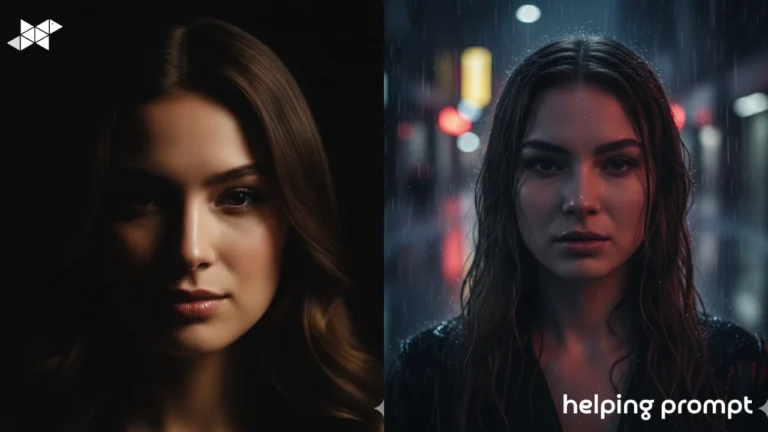
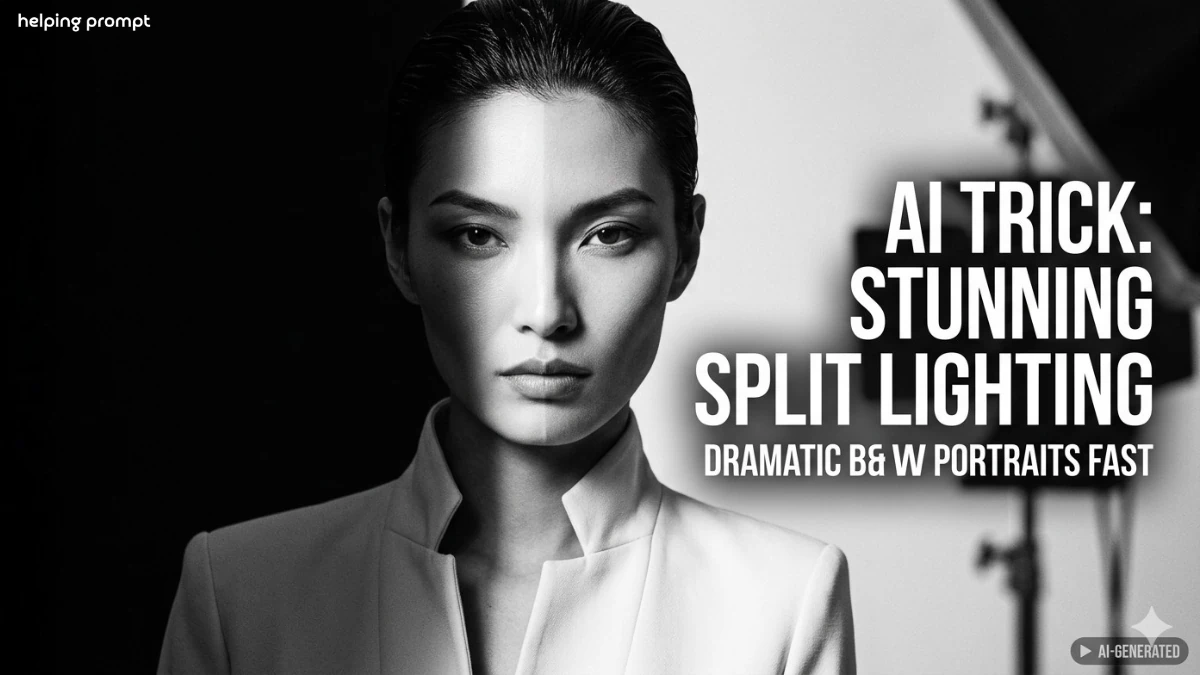
To achieve dramatic split lighting, use exact phrases like “cinematic chiaroscuro.” Force high contrast by specifying one side of the face in deep shadow. Always pair this with “black and white photography” for the absolute best mood.
My Real-World Experience
I tested these exact prompts across Midjourney v6 and DALL-E 3 on my mobile.
At first, the lighting kept washing out the facial features completely.
I realized that adding “structured high-collared jacket” grounds the shadows perfectly.
Once I forced the “vertical split lighting” parameter, the results absolutely blew me away.
Copy & Paste Prompts
"Black and white portrait of a woman with slicked-back dark hair, high cheekbones, and angular facial features. She wears a structured, high-collared light jacket. The composition features dramatic split lighting bisecting her face vertically, leaving one half in deep shadow and the other brightly lit. Intense gaze, sharp focus, high contrast, cinematic chiaroscuro style, shot on 35mm lens, 8k resolution, photorealistic masterpiece, dramatic mood, fashion editorial aesthetic."
"Close-up black and white portrait featuring severe split lighting. A female model with sharp angular cheekbones and dark slicked-back hair stares directly at the lens. High-collared structured jacket. One side of her face is completely engulfed in pitch-black shadow. The other side reveals sharp, high-contrast bright highlights. Cinematic chiaroscuro photography, hyper-detailed skin texture, award-winning portraiture, studio lighting setup, unedited raw photograph, 85mm portrait lens."
"Fashion editorial black and white photograph of an edgy woman. Slicked-back dark hair and aggressive angular facial features. Wearing a stiff, high-collared light jacket. Dramatic vertical split lighting perfectly divides her face down the middle. Left side deep shadow, right side brilliant highlight. Cinematic chiaroscuro, extremely sharp focus, high contrast monochrome, intense eye contact, Vogue magazine cover style, professional studio strobe lighting, ultra-realistic AI generation."
"Gritty high contrast monochrome portrait of a female subject. She possesses sharp cheekbones, slicked dark hair, and a structured light coat. Intense chiaroscuro lighting creates a perfect vertical split across her face. Deep, impenetrable shadow on one half, blindingly sharp light on the other. Cinematic and moody atmosphere. Intense, piercing gaze. Shot on Leica monochrome, ISO 400, fine film grain, photorealistic output, raw and unpolished aesthetic, highly detailed AI portrait."
"Cinematic split lighting portrait in pure black and white. Angular woman with slicked hair and a high-collared jacket. Intense chiaroscuro bisecting the face exactly in half. High contrast shadows meeting bright studio highlights. Piercing stare into the camera. Masterpiece digital photography, hyper-realistic skin details, perfect anatomical proportions. Midjourney v6 photorealism, award-winning lighting design, deep emotional impact, crisp focus, stunning monochrome portrait format."
Quick Settings Guide
- Recommended AI model: Midjourney v6 or Stable Diffusion XL.
- Aspect ratio: 4:5 or 2:3 for vertical mobile formats.
- Tone style: High contrast, moody, cinematic.
- Creativity level: Low stylize for maximum realism.
- Best platform: Discord mobile app or ComfyUI.
- Ideal use case: Fashion mockups, character art, editorial shots.
Pro Tips for Better Lighting
- Use lens specifics: Always add “85mm lens” to flatten facial distortion.
- Control the background: Specify “pure black background” to boost contrast.
- Add film grain: Use “ISO 400” for a natural, human skin texture.
- Keep prompts linear: Put your lighting instructions near the beginning.
- Avoid over-styling: Remove descriptive words like “illustration” or “drawing.”
Common Mistakes to Avoid
- Using too many lighting sources, which ruins the strict split-light effect.
- Forgetting to specify clothing, which causes messy shadow transitions.
- Over-prompting eye details, which creates an unnatural, plastic stare.
User Experience Discussion
Many AI artists find that DALL-E 3 struggles with true pitch-black shadows.
Midjourney users consistently report better handling of chiaroscuro lighting on faces.
The digital community agrees that keeping prompts under 50 words yields sharper contrasts.
FAQ
Use exact keywords like “chiaroscuro” and “vertical split lighting” in your prompt. Always specify “high contrast monochrome” to avoid gray, washed-out images.
You probably have too many conflicting light sources in your text. Stick to one directional light phrase to keep shadows bold.
Midjourney currently handles deep black shadows much better than competitors. It respects high-contrast keywords with much more cinematic accuracy.
Yes, you can easily copy and paste these into mobile AI apps. Apps like ChatGPT or the Discord mobile app work perfectly.
It refers to the strong visual contrast between light and dark areas. It is the secret to making digital portraits look like classic fine art.
How to Create Dramatic Black and White AI Portraits
- Choose your tool: Open Midjourney, DALL-E 3, or your favorite AI generator.
- Copy a prompt: Grab one of the highly detailed prompts from above.
- Adjust the subject: Change the hair or clothing to fit your specific vision.
- Paste and generate: Hit enter and wait for the AI to process the image.
- Pick the best: Select the variation with the cleanest shadow bisection.
- Refine the contrast: Use mobile editing tools to crush the black levels deeper.
Final Thoughts
Mastering lighting is the ultimate cheat code for digital creators today. When you finally nail that perfect shadow, it feels incredibly rewarding. I highly encourage you to tweak these prompts to match your own unique style. Don’t be afraid to push the contrast limits in your AI settings.
Drop these exact phrases into your generator and watch the magic happen instantly.The future of AI photography is undeniably leaning toward extreme, raw realism. Keep experimenting, stay curious, and keep creating beautiful things from your phone.