Amazing NotebookLM Uses: 5 Smart Free AI Tricks in 2026?
AI tools are exploding in 2026, but most users still miss NotebookLM’s hidden power.
Smart creators now use 5 Free AI NotebookLM Tricks uses beyond studying for work, research, and productivity.
From interview prep to organizing PDFs, this free AI tool saves serious time daily.
Try tools like NotebookLM and Google AI Studio to build smarter workflows faster.
Why NotebookLM Is Suddenly Trending
Most AI tools search the internet.
NotebookLM works differently.
It learns from your own files.
That means better accuracy, fewer distractions, and more focused answers.
You can upload:
- PDFs
- Research papers
- YouTube transcripts
- Notes
- Blog articles
- Work documents
Then ask questions naturally.
That simple workflow changes everything.
5 Free AI NotebookLM Tricks Uses for Everyday Productivity
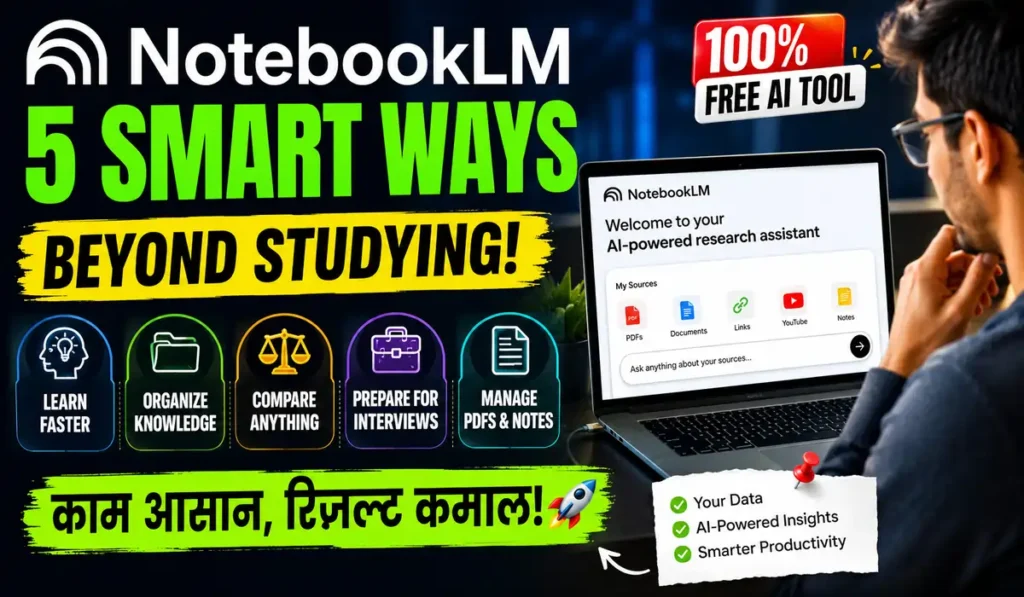
1. Learn Skills Faster Without Information Overload
Learning online feels messy today.
Too many tabs destroy focus quickly.
NotebookLM fixes that problem beautifully.
Upload tutorials, guides, and notes into one notebook.
Then ask simple questions like:
- Explain this simply
- Create a learning roadmap
- Compare two methods
- Summarize key concepts
Because answers come from your files, learning feels more personalized.
That makes complex topics easier instantly.
2. Build a Personal Knowledge Base
Most people lose important information constantly.
Screenshots disappear. Bookmarks get forgotten.
NotebookLM becomes your searchable second brain.
Store everything in one organized space:
- PDFs
- Meeting notes
- Articles
- Planning documents
- Research files
Then search naturally instead of digging through folders.
This saves huge time daily.
3. Compare Tools, Gadgets, and Software Easily
Buying decisions feel overwhelming today.
Too many reviews create confusion.
NotebookLM helps simplify comparisons quickly.
Upload product reviews, feature lists, and pricing pages.
Then ask:
- Which tool suits beginners?
- Compare pricing
- List pros and cons
- Summarize user complaints
As a result, decisions become clearer and faster.
4. Prepare for Interviews Smarter
Interview preparation normally takes hours.
NotebookLM speeds everything up dramatically.
Upload:
- Job descriptions
- Company pages
- News articles
- LinkedIn profiles
- Product information
Then ask AI-powered questions instantly.
For example:
- What are the company priorities?
- What interview questions may appear?
- Summarize company culture
- Match my experience to this role
That creates stronger confidence before interviews.
5. Organize Tutorials and PDFs Properly
Most people collect learning content endlessly.
But they rarely revisit saved material.
NotebookLM solves this perfectly.
Create separate notebooks for:
- Career growth
- Productivity
- AI learning
- Long-term projects
- Personal research
Because AI sits on top of your files, information stays useful instead of forgotten.
1. NotebookLM Uses for Learning Faster
“Act as an advanced AI learning coach using NotebookLM uses. Analyze uploaded tutorials, PDFs, and YouTube transcripts. Create a beginner-to-advanced roadmap with simplified explanations, practical exercises, learning milestones, skill gaps, and weekly action plans. Compare different learning methods and prioritize essential concepts first. Follow Trending Updates, Future Applicable, Follow Real Study Data.”
2. NotebookLM Uses for Personal Knowledge Management
“Act as a smart AI knowledge manager using NotebookLM uses. Organize uploaded research papers, notes, screenshots, project documents, and articles into a searchable knowledge system. Generate summaries, identify repeated concepts, highlight critical insights, connect related ideas, and create productivity workflows for faster information retrieval. Follow Trending Updates, Future Applicable, Follow Real Study Data.”
3. NotebookLM Uses for Tool Comparisons
“Act as an AI product research assistant using NotebookLM uses. Compare uploaded software reviews, pricing pages, feature lists, customer feedback, and workflow documents. Create detailed pros-and-cons analysis, beginner recommendations, value comparisons, workflow compatibility reports, and productivity suggestions with easy-to-read summaries. Follow Trending Updates, Future Applicable, Follow Real Study Data.”
4. NotebookLM Uses for Interview Preparation
“Act as a professional interview preparation AI using NotebookLM uses. Analyze uploaded job descriptions, company websites, LinkedIn profiles, annual reports, and industry news. Generate likely interview questions, company culture summaries, role expectations, confidence-building answers, and skill-matching insights for candidates. Follow Trending Updates, Future Applicable, Follow Real Study Data.”
5. NotebookLM Uses for Organizing Research
“Act as a powerful AI research organizer using NotebookLM uses. Process uploaded PDFs, tutorials, research files, productivity notes, and reference documents. Build categorized notebooks, generate instant summaries, highlight key findings, connect related ideas, and create actionable productivity systems for long-term organization. Follow Trending Updates, Future Applicable, Follow Real Study Data.”
How To
The best NotebookLM uses include learning, interview preparation, research organization, and AI-powered note management.
Yes, NotebookLM currently offers free AI-powered productivity and learning features for most users.
Yes, NotebookLM uses uploaded PDFs to generate summaries, insights, and simplified explanations quickly.
Quick Settings Guide
- Use NotebookLM uses with PDFs and YouTube transcripts
- Create separate notebooks for every project
- Enable Audio Overview for podcast-style summaries
- Upload only trusted files for better answers
- Keep notes categorized for faster AI responses
Pro Tips
- Upload smaller focused documents for cleaner answers
- Use comparison prompts for buying decisions
- Create weekly notebooks for productivity tracking
Conclusion
That creates more accurate and personalized results. As AI workflows continue growing in 2026, experimenting with NotebookLM uses can seriously improve productivity for creators, freelancers, professionals, and learners. Start with one notebook today, upload your existing files, and test how much faster your workflow becomes. Small AI habits today can create massive efficiency gains tomorrow.
NotebookLM is no longer just a study tool for students. It is becoming one of the smartest free AI productivity systems available today. Whether you want faster learning, cleaner organization, smarter interview preparation, or easier research management, this tool quietly removes information overload from daily life. The biggest advantage is that it works using your own trusted sources instead of random internet content.
FAQs
- How to start using NotebookLM uses effectively?
Upload organized PDFs, tutorials, and notes first. Then ask clear AI questions for better results.
- How to use NotebookLM uses for interviews?
Upload job descriptions and company information. Then generate interview questions and company summaries.
- How to improve productivity with NotebookLM uses?
Create separate notebooks for projects and regularly upload important research, tutorials, and documents.