
Want a portrait that instantly grabs attention on Instagram or WhatsApp?
A stylish street look with cinematic lighting can completely change your digital presence.
Using tools like Gemini AI, Midjourney, or other image generators, you can create a high-quality realistic portrait with detailed fashion styling, perfect lighting, and a soft bokeh background – without hiring a photographer.
How to Create a Cinematic Street Portrait with AI
A strong AI portrait is not just about clothes. It’s about attitude, lighting, and background balance.
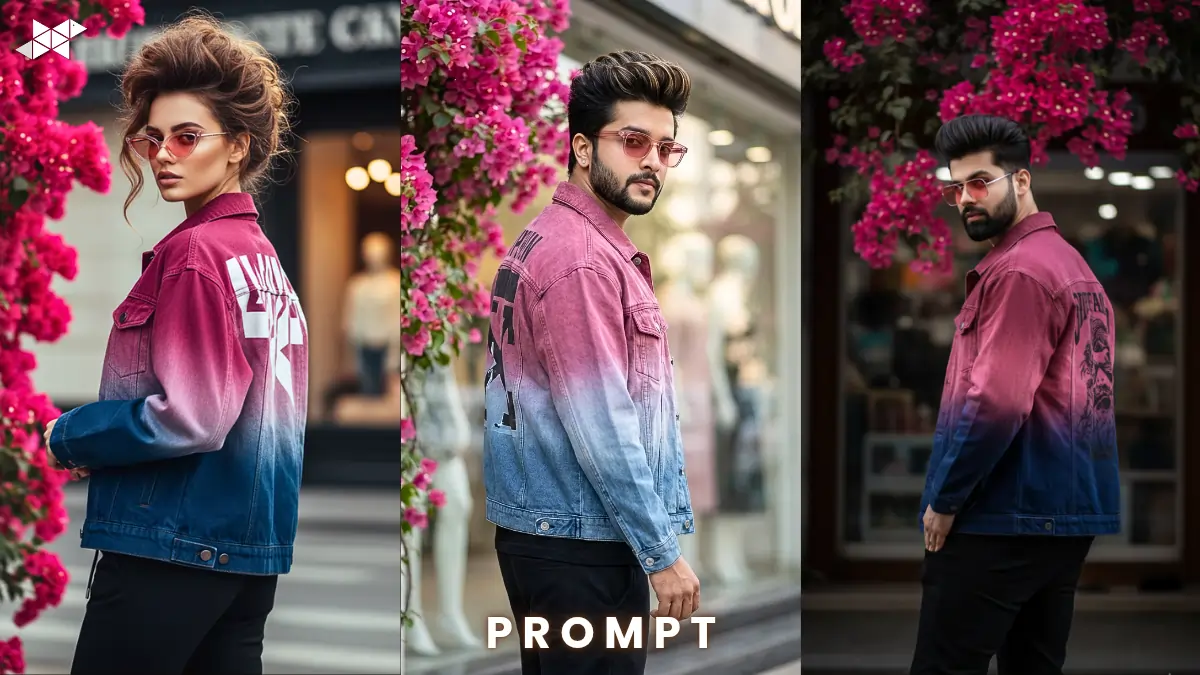
- Voluminous pompadour hairstyle with subtle highlights
- Trendy oversized ombre denim jacket (dark pink to blue fade)
- Graphic print detail on the back
- Black joggers for contrast
- Light eyes with pink sunglasses
- Side-profile over-the-shoulder pose
- Pink bougainvillea flowers + blurred urban storefront
- Natural cinematic lighting with soft bokeh
Ultra-Realistic Cinematic Version:
Prompt:
Create a high-quality portrait of a stylish young woman with a voluminous pompadour hairstyle and subtle brown highlights. She is wearing an oversized ombre denim jacket transitioning from dark pink to blue with a bold graphic print on the back, paired with black joggers. She has light-colored eyes and pink sunglasses. She is posing in a side profile, looking over her shoulder confidently. The background features vibrant pink bougainvillea flowers and a blurred urban storefront with soft bokeh. Natural light, cinematic lighting, DSLR quality, sharp focus, 85mm lens effect.”
Explanation: Focuses on realism, lens detail, and lighting.
Best Use: Instagram profile photo, premium DP, portfolio portrait.
Soft Fashion Editorial Style:
Prompt:
“Generate a fashion editorial style portrait of a trendy young man with a textured pompadour hairstyle and subtle highlights. he is dressed in an oversized ombre denim jacket fading from deep pink to cool blue with a stylish graphic design on the back and fitted black joggers. He wears soft pink sunglasses and has light eyes. he stands in a side-profile pose, glancing over his shoulder. Behind him are bright pink bougainvillea flowers and a softly blurred city storefront creating a creamy bokeh effect. Natural daylight, smooth skin tones, soft cinematic contrast, high detail.”
Explanation: Slightly softer, magazine-inspired look.
Best Use: Snapchat story, fashion reels, Instagram carousel.
High-Contrast Urban Street Look:
Prompt:
“Produce a high-contrast urban street portrait of a confident young man with a dramatic pompadour hairstyle and subtle shine highlights. He wears a bold oversized ombre denim jacket shifting from dark pink to blue, graphic print visible on the back, styled with modern black joggers. His light eyes are partially visible behind pink tinted sunglasses. He poses sideways, looking back over his shoulder with attitude. The background includes vivid pink bougainvillea and a blurred urban shopfront with strong bokeh. Natural light mixed with cinematic shadow depth, ultra sharp, 4K detail.”
Explanation: Strong contrast and bold mood.
Best Use: WhatsApp DP, attitude status, street-style posts.
Quick Tips for Better AI Portrait Results
- Mention lens type (85mm or 50mm) for realistic depth.
- Always add “soft bokeh” or “shallow depth of field” for background blur.
- Use words like “natural light” and “cinematic lighting” together.
- Specify pose clearly – “side profile, looking over shoulder.”
- If needed, add “sharp focus on face” to avoid blurry details.
Because small prompt details change output quality, refining wording improves results significantly.
CONCLUSION:
A strong AI portrait is built on styling, lighting, and pose clarity.
With the right prompt structure, you can create a premium cinematic street portrait in minutes.







Leave a Reply