
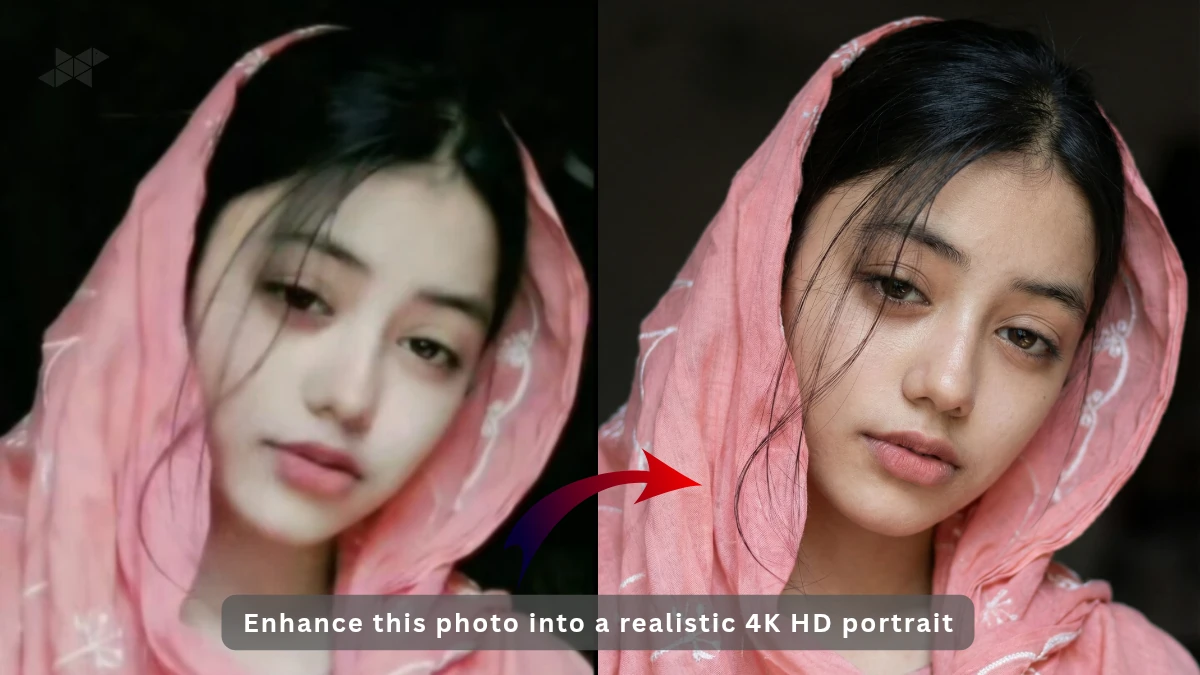
If you are trying to enhance this photo into a realistic 4K HD portrait of a young woman, you are not alone. Creators, bloggers, and social media users are increasingly using AI to upgrade ordinary images into studio-quality portraits. The goal is simple: keep the face real, natural, and believable, while improving sharpness, lighting, and overall depth.
In this guide, you will learn how to create realistic 4K HD portraits with soft natural lighting, smooth but natural skin texture, DSLR-like clarity, and cinematic depth of field—without making the image look artificial or over-edited.
Why Enhance This Photo into a Realistic 4K HD Portrait Matters
Enhancing a photo into a realistic 4K HD portrait is not about changing the person. It is about refining what is already there. Subtle lighting, accurate skin texture, and sharp focus can turn a normal image into something that looks professionally shot.
This approach works especially well for profile photos, blog images, portfolio portraits, and thumbnail visuals where realism builds trust instantly.
Key Elements of a Realistic 4K HD Portrait Enhancement Prompt
When you enhance this photo into a realistic 4K HD portrait, your prompt should clearly mention these essentials:
- Soft natural lighting, not harsh studio lights
- Smooth but natural skin texture, no plastic look
- Neutral or minimal background
- DSLR camera quality with sharp focus
- Realistic facial details and proportions
- Cinematic depth of field for background blur
Keeping these points balanced prevents the AI from overdoing beauty effects.
Best AI Prompt to Enhance This Photo into a Realistic 4K HD Portrait
Use this prompt when you want a clean, professional, and natural result.
Enhance this photo into a realistic 4K HD portrait of a young woman.
Preserve original facial features and expressions.
Soft natural lighting with gentle highlights on the face.
Smooth but natural skin texture, visible fine details, no over-smoothing.
Neutral background with subtle blur.
DSLR camera quality, sharp focus, realistic facial details.
Cinematic depth of field, professional portrait photography style.
Ultra-high resolution, natural color grading, lifelike appearance.
Cinematic Style Prompt for Realistic 4K HD Portrait Photography
If you want a slightly dramatic but still realistic look, try this version.
Transform this image into a realistic 4K HD cinematic portrait.
Natural daylight lighting with soft shadows.
Accurate skin texture, realistic pores, balanced tones.
Shallow depth of field, DSLR lens look.
Neutral background, sharp subject focus.
Professional portrait photography, film-like color grading.
High realism, no artificial beauty filters.
Minimal Retouch Prompt for Natural 4K HD Portrait Results
For users who prefer almost zero retouching and maximum realism.
Enhance this photo into a natural 4K HD portrait.
Maintain original skin texture and facial details.
Very soft lighting, realistic highlights, no glamour effects.
Clean neutral background.
DSLR-quality sharpness with subtle depth of field.
True-to-life colors, professional photography finish.
Common Mistakes to Avoid While Enhancing 4K HD Portraits
Many people complain that AI portraits look fake. This usually happens because of small mistakes:
- Adding “perfect skin” instead of “natural skin texture”
- Overusing beauty or fashion keywords
- Ignoring lighting direction
- Using too many style references in one prompt
Less is often more when realism is the goal.
When to Use Realistic 4K HD Portrait Enhancements
Enhancing a photo into a realistic 4K HD portrait works best for:
- Personal branding images
- Blog and Google Discover featured images
- Portfolio or resume photos
- Professional social media profiles
In these cases, realism feels trustworthy and human.







Leave a Reply