
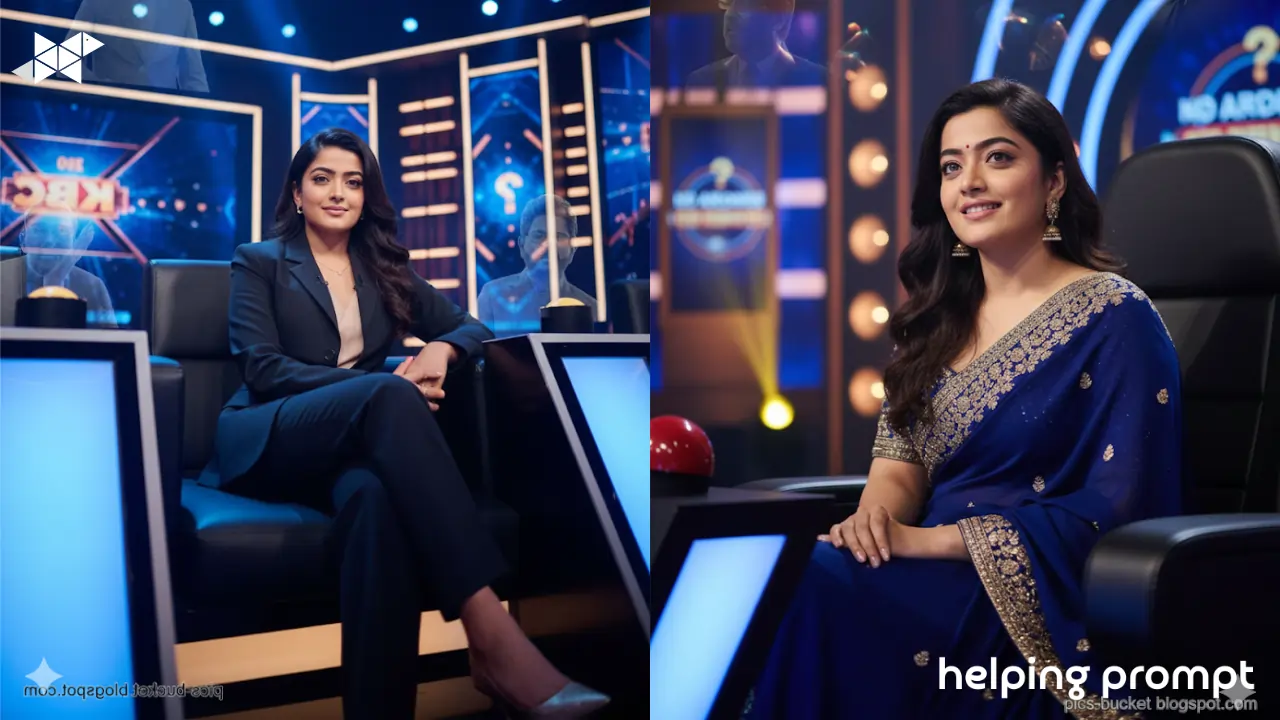
This guide shows beginners how to turn a normal photo into a cinematic KBC-style portrait. The twist? Soft hologram silhouettes inspired by legendary KBC hosts, blended respectfully into the background while you stay the hero of the frame.
How to Use It
- Upload a clear photo with good lighting (front-facing works best).
- Paste one prompt at a time into your AI image generator.
- If the result feels crowded, reduce background intensity in the prompt.
- Keep facial details sharp and lighting dramatic for a TV-show look.
2 Best AI Prompt Examples
Ultra-realistic cinematic portrait using the uploaded photo, person seated confidently on the Kaun Banega Crorepati hot seat, official KBC studio background with deep blue and golden lighting, circular LED patterns, glowing question graphics, premium TV game show atmosphere, subtle hologram silhouettes inspired by legendary KBC hosts as soft light reflections in the background, subject wearing elegant Indian formal attire, studio-quality face lighting, sharp focus, DSLR look, dramatic shadows, broadcast-level realism, slightly low camera angle, confident and victorious mood
Create a hyper-realistic KBC-style portrait from the uploaded image, subject sitting on the iconic hot seat, grand quiz show set with blue-gold color tones, illuminated screens and floating question visuals, respectful hologram outlines of legendary KBC hosts blended into background lighting, main subject dominant and sharp, formal suit attire, cinematic lighting on face, shallow depth of field, professional television broadcast aesthetic, low-angle shot symbolizing success and achievement
Takeaway
Start simple. Use one strong prompt, review the result, then tweak lighting or background intensity-not everything at once. The best KBC-style portraits feel confident, clean, and cinematic, not crowded. When in doubt, let you shine brighter than the stage.
Disclaimer –
“Inspired by the visual style of popular TV shows, not affiliated with or endorsed by any official brand.”







Leave a Reply